Showing posts with label HTML5. Show all posts

Saturday, May 27, 2023

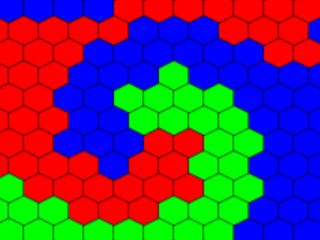
HexLife Beta

This is it for today and I am not sure how much time I will have Sunday and Monday, probably just Monday morning. The beta is on Spelchan.com, but there is a lot of work that needs to be done. What I want to get done before Monday’s deadline:

  • More levels, as a single simple test level is not much of a campaign.
  • Better title screen
  • Instruction screen

What I hope to get done by Monday:

  • Transition animation between generations.
  • Ability to save and load levels.

What I will do after Monday’s deadline:

  • Write a postmortem.
  • Clean up the code. Right now, pretty smelly as I fell into the time pressure trap.

Possibly spend a few weeks going over my code (not sure if this would be here or on Spelchan.com). 

Thursday, May 25, 2023

Hex Life Editor update

 I forgot how much work creating a GUI from scratch was. This is why libraries are nice but I am doing this from scratch. I now have an editor but still need to add a way of taking the edited levels and playing them as well as set goals for a level and a partial editor that lets the player place their color of cells on the board. 

Early build of editor mode for my HexLife game

My thoughts are that the goal will be to give the player an existing layout sans their color, and they need to strategically place their color in such a way that their color will end up taking over the entire board. I am not sure I will have much time at all tomorrow to work on this, but should be able to release a version of the editor and player Saturday. This would leave Sunday and Monday to create a set of levels and fine tune things.

Tuesday, May 23, 2023

Let there be Life

 When I said I was going to program the game from scratch, I wasn’t kidding. As I am trying to move back to test driven development, as I believe the AI world of programming will become more natural language programming with the responsibility of the programmers to make sure that what the natural language produces actually works properly so creating and testing programs will become a vital skill for the future of programming. I don’t think programmers will be going away, but their roles will be more focused on design, testing, security, and optimization. Still, using a testing framework would be third party, so I wrote my own simple testing framework (when I post the final version the tests will be included).

Writing automated tests seems to be slow, but I notice that I find bugs much quicker and am a bit more confident that my code does what it is supposed to. My tests are not as thorough as they should be but good enough for the scope of the project I am working on.

When creating the game, I realized my idea of moving cells was very problematic, so opted for a growing effect with the eating of cells being a predominant feature. Text versions seemed to work so I bit the bullet and created a graphical version (manually tested as graphics/GUIs are way too painful to automate, and if the underlying code it calls is tested there shouldn’t be a problem).

The simulation was automated and just generating random grids results in really cool results. The first phase has been posted so Thursday I will be focusing on creating an editor and the weekend on putting together a short campaign where you will be given a map and need to place your cells in such a way that they will take over the map. Something has come up for Wednesday, so while I might get an hour or two in, it is likely not going to be very much. Hopefully I will have something Thursday night to show, as Friday is busy. Why everything comes up when I want to do a Game Jam is annoying, but it is what it is.

The first build is available at https://spelchan.com/games/y2023/HexLife/index.php

See you Thursday???

Thursday, July 14, 2022

The fullscreen API

With my masters degree finally complete, I should have a bit more time to focus on my site. Unfortunately, my Dad is now disabled so I am taking care of him and being a care-taker has been taking far more time than anticipated. As he slowly improves, the amount of time I have available to work on my own things is slowly increasing but this may change shortly depending on upcoming events which I will talk about if they come to pass.  Reworking my site is certainly something that needs to be done. One of the big issues that I have is the size to make my games.

The problem is that there is no way of knowing what resolution that the user of a web application is using. The image below shows the different common resolutions that have been used in the past to the present. Making this problem more awkward is that windows don’t need to be full screen and different browsers have different amounts of stuff surrounding the page contents.


My plan was to use a 16x9 aspect resolution for future games as that has become the standard screen size. With most modern machines having at least 1280x720 resolution so 1024x576 seemed like an okay resolution to use for future games and I have been playing around with this. On my desktop machine, which was HD, this looked okay but when my monitor was upgraded to a 4k monitor, the locked resolution problem became exceedingly apparent. 

Two viable solutions came to my mind. The first is full screen mode that I have seen other sites take advantage of for videos. Looking into this, I discovered the fullscreen API and decided to explore this with my Canada Day game that I released on Canada Day (July 1st for the non-Canadian’s reading this). The API is easy to use once you have figured out how to use it, but as is often the case it does have a few weird aspects to it.

The API is invoked on a HTML display element which becomes full screen if the browser supports this. This is simply done by calling the element’s requestFullscreen method. This is simple enough but exiting full screen is not done by calling the element’s exitFullscreen method as any reasonable person would expect. Instead, you need to tell the document that you wish to exit full screen mode. While I can sort of see the logic behind this, as the element is becoming full screen and the document is returning from full screen, but couldn’t elements have an exitFullscreen method that calls the document version? API design really needs to be improved in this industry.

Once you are full screen, the next issue crops up. The canvas is the wrong resolution so it needs to be adjusted. This is assuming that you were even successful at switching to full screen. There is a “fullscreenchange” event that is triggered by switching between full and regular modes so writing a handler for the switch is easy enough. Finding the resolution for the full screen can then be done by using the screen.width and screen.height read-only variables.

function toggleFullscreen() {
let canvas = document.getElementById("game");
if (document.fullscreenElement == null) {
canvas.requestFullscreen();
} else {
document.exitFullscreen();
}
draw();
}
function fullscreenChangedHandler(event) {
let canvas = document.getElementById("game");
if (document.fullscreenElement != null) {
canvas.width = screen.width;
canvas.height = screen.height;
} else {
canvas.width = 1024;
canvas.height = 576;
}
canvasRect.w = canvas.width;
canvasRect.h = canvas.height;
}

The game can then be developed in 4K and scaled to the resolution of the display. My thoughts are 4K will be good for a while so will use that as a baseline resolution for my future development. Scaling to lower resolutions may not be the best approach but works good enough for now. Ideally having different images for different resolutions would be the better solution but it may be quite a while before I bother working on my LOD system and I will likely switch from canvas 2d to webGLx before doing so.

Locking the canvas size in the non-fullscreen mode is the next challenge. I am thinking that the canvas should scale based on the canvas size so next month’s game will be experimenting with that.  

Thursday, April 14, 2022

Making Santa-Tac-Toe part 4 of 4

Part 4: Building the GUI

 In the previous parts, we created the core game logic and the AI agents that play the game. This was probably the most difficult part of this project, and we would not have a game without this work. Unfortunately, the part of the project that users care about is the user interface as this is what they see. User interface code tends to be bulky but simple so for this chapter we are just going to summarize what the classes that make up the user interface do and how they work together. For those readers are interested in detailed code, the source code is located at https://github.com/BillySpelchan/BlazingPorts.

As is common, the graphics for the game are all combined into an image file known as an image atlas. A scaled down version of the atlas image is shown below. As can be seen, all of the screens and the messages are images for this game to make things really quick. The downside to this approach opposed to programmatically building the display from simpler pieces is that the images are much larger and use up more space. For this simple game, the costs of a longer image loading time is more than offset by the improved performance and simplicity in coding.


All the image bounds and positioning information is stored in an object called STTConsts. Using an object to hold all the games constants keeps tuning information all in one area, making for an easy way to configure things.  In addition to placement information, the config also holds button configuration, enumerations, and AI settings for the two different opponents. A more general configuration file would probably want to avoid non-JSON data types for security and maintainability reasons.

Our game is screen based, with the STTMain class handling switching and controlling the screens. Having all screens controlled by a common host has the added, but not utilized here, advantage of being able to share messages and state information between screens. Screens used in the game share a common class creatively named Screen. This class has two utility methods to ease the UI requirements of the game. The createButton(label, bounds) method creates and adds a button to the display list. Likewise, createImage(atlasEntry, position=null) retrieves an image from the image atlas and displays it at the specified location.

The LoadingScreen class is the initial screen that is shown. loading screen only one which doesn’t use images from the atlas but instead displays a loading message until image atlas has been loaded. Once the image atlas has been loaded, the TitleScreen class is used to display the title. It has buttons to switch to the InstructionsScreen or one of two instances of the SelectScreen class. The InstructionsScreen simply displays three images that make up the instructions.

The SelectScreen has parameters for setting the background image and labels to allow both Santa and Krampus to present level options to the player. This determines which AI and which instance of the GameScreen will be called.

As with the SelectScreen, the GameScreen has configurable images so Santa and Krampus have their own screens. The game screen uses the STTTile class which uses images of Santa for X and Krampus for O which are displayed in the board. Game state messages are displayed as a comic-book dialog bubble at the top of the screen. Finally, the PlayAgainPrompt class is used to prompt the player if they want to play again once the game is over.


Monday, March 14, 2022

Making Santa-Tac-Toe part 3 of 4

 Part 3: Random Moves Meet Monty Carlo

Thanks in small part to AlphaGo, there is a huge interest in Monty Carlo Tree Search (MCTS). As the name implies, this is built off the idea of a Monty Carlo Simulation, where you run a large number of random simulations to help determine the best configuration of what is being simulated. Tic-Tac-Toe is too simple for MCTS, but the simulation aspect would be simple to implement and could be interesting so lets do that. We will then look at what would need to be done to turn the simulation into a proper MCTS AI. 

The heart of a simulation is the ability to play a random game. This is simply a matter of making random moves until the game is in a win or tie state, at which point we return the state of the game so we can keep track of the wins and losses.

playMockGame(board, curPlayer) {
   
let b = new TTTBoard(board.getTemplate());
    let
state = b.getGameState();
    let
p = curPlayer;
    while
(state.state === TTTConsts.PLAYING) {
        b.
setTileByIndex(super.getNextMove(b, p), p);
       
p = (p === TTTConsts.X) ? TTTConsts.O : TTTConsts.X;
       
state = b.getGameState();
   
}
   
return state;
}


We want to score each potential move that a player can make, so simply loop over all the moves adding them to our scores array which we will be using for the next move method that our API requires we implement.

buildScoreBoard(board, curPlayer) {
   
let scores = [];
    for
(let i = 0; i < 9; ++i)
        scores.
push(this.scoreTile(board, i, curPlayer));
    return
scores;
}

Scoring a tile is simply a matter of making sure the move is valid, followed by playing several mock games and counting how many of the games the AI wins versus the losses.

scoreTile(board, index, curPlayer) {
   
if (board.getTileByIndex(index) !== TTTConsts.EMPTY)
       
return -2 * this.trials;
    let
winState = (curPlayer === TTTConsts.X) ? TTTConsts.X_WON : TTTConsts.O_WON;
    let
loseState = (curPlayer === TTTConsts.X) ? TTTConsts.O_WON : TTTConsts.X_WON;
    let
score = 0;
    this
.testBoard.clone(board);
    this
.testBoard.setTileByIndex(index, curPlayer);
    let
opponent = (curPlayer === TTTConsts.X) ? TTTConsts.O : TTTConsts.X;
    for
(let i = 0; i < this.trials; ++i) {
       
let state = this.playMockGame(this.testBoard, opponent);
        if
(state.state === winState) score += 1;
        if
(state.state === loseState) score -= 1;
   
}
   
return score;
}

Finally, implementing getNextMove is simply a matter of calling buildScoreBoard and then picking the highest score. We add a random value to each score as a tiebreaker.

getNextMove(board, playerToMove= TTTConsts.EMPTY) {
   
let scores = this.buildScoreBoard(board,playerToMove);
    let
index = 0;
    let
high = scores[0] + Math.random();
    for
(let i = 1; i < 9; ++i) {
       
let temp = scores[i] + Math.random();
        if
(temp > high) {
            index = i
;
           
high = temp;
       
}
    }

   
return index;
}

The MCTS algorithm is a bit more involved than what we are doing, but with such a small tree, implementing a full MCTS is purely academic. We would need to track a bit more information for each node in the game to properly do MCTS. Lets quickly take a look at the algorithm. It is broken into 4 basic steps.

1 Selection. The idea here is that we pick a node that we want to explore further. This is usually done by looking at the win/loss ratio in combination with the times the node has been looked at for the nodes that are not fully expanded. We want to pick the most promising node but at the same time want to make sure that each node is explored enough to properly estimate it’s worthiness. There are many methods to do this though the simplest is to use threshold * (wins+1)/(plays+1) but there are better methods available.

2 Expansion is simply to add one of the unexplored nodes of the target onto our tree. Instead of just having a scoreboard for the current round, we would need to track all the nodes we have expanded in some type of tree structure and keep track of the win/loss ratio for all of them.

3 Simulation (playing random game), what we are doing already.

4 backpropagation. Taking the score the expanded node received and passing it through all the parent nodes adjusting their probability. Remember to consider who has won so that you invert the win/loss ratio from opponent nodes.

The big issue here is that it is easy to run out of memory as you expand. One solution to this is to cap the number of nodes allocated and when you run out of nodes go into a pruning stage where you remove nodes of poorly performing choices. A node pool is a good way of doing this as when the pool is empty, you do a pruning pass adding pruned nodes (including children) back into the pool.

Now that we have several AI agents, we can put together our Christmas game. This will be covered in the next part.


Friday, January 14, 2022

Making Santa-Tac-Toe part 1 of 4

 Part 1: Preparing for Santa and Krampus

Santa Tac Toe is a JavaScript port of a game I created when working as a teaching assistant for a course in AI. We had a team project where groups would create AI controlled players for the game of Amazons. Our summer terms are condensed to two months with double the lecture and lab time. To help students start their AI, I wrote a simple Tic Tac Toe game in Java to demonstrate recursive AIs. The advantage here is the search tree is so small that things like alpha-beta pruning and techniques for scoring a position are not covered so they would still need to figure those out themselves but would still have a starting point. This approach will be covered in part 2.  A popular technique for games, largely due to Alpha Go, is Monty Carlo Tree Search. While I didn’t want to do a full MCTS AI, in Part 3 we look at the starting point for this technique. Finally, in Part 4 we will make everything pretty by creating the GUI for the game.

 As most of my personal projects tend to be small, I tend to rely a bit too much on manual testing. This is not a bad thing, but as projects get larger and more people are involved, automated testing makes more sense. One of the trendy test driven development methods is red/green testing, which does sound like a good idea but has its detractors. The idea is you write a test first and after it fails, you write the code to make it pass the test. For code where it is easy to write automated tests, I am using Jasmine to write tests. For user interface and animation related stuff, I am still largely going to rely on manual testing, but as problems here will quickly be apparent this shouldn’t be too bad of a compromise. I do need to find a decent GUI testing suite but am not sure such a beast actually exists. For those of you interested in my test code, it is in the repository.


The board is simply an array of numbers, set up as a single dimensional array stored as shown in the figure above. Numbers were chosen instead of characters due to being faster. An alternative approach would be to store the board as a string, but strings are immutable in JavaScript. Altering a string creates a new one, and if you are replacing the old string then it gets garbage collected. To aid debugging, the constructor takes a string representation of the board and can create a string representation for logging or other debugging tasks.

Setting and getting tiles is trivial enough. The key method here is the getGameState() method which fills out the TTTState class with information about the current state of the board. Simply put, the game can be in progress, the X player (Santa) could have won, the O player (Krampus) could have won, or there are no more moves so the game ends in a tie (Cat). For win conditions, the line that forms the win is necessary so a way of checking lines on the board is needed.

The checkLine method assumes the starting location is correct for the direction being checked as this is meant for internal use. All that needs to be done is to check if three tiles all contain the same non-empty value and return true if they are. Because we are storing the value in an array, we can use steps to find the appropriate locations. Horizontal lines step at +1, vertical lines step at +3, diagonal step at +4 for right diagonals and +2 for left diagonals.

checkLine(x,y,direction) {
   
let index = x + y * 3;
    let
startTile = this.board[index];
    if
(startTile === TTTConsts.EMPTY)
       
return false;
    let
offset = TTTConsts.LINE_OFFSETS[direction];
    return
(this.board[index+offset] === startTile) &&
        (
this.board[index+offset+offset] === startTile);
}


With this we can work out the state of the game. We start by assuming the game is in progress. We then quickly check to see if the board is full. If so, we know there is either a win or a tie, so set the state to tie but continue checking to see if it is actually a win. Each of the possible horizontal and vertical wins are checked using the checkLine method above. Finally we check the two diagonal moves.

getGameState() {We now have the basics for the game but need players. As we are focusing on AI players, we will start with the easiest possible AI player, one that makes moves at random. When called, this agent simply picks a tile at random, then we see if that is a valid tile and if not move to the first open tile.
    this.gameState.state = TTTConsts.PLAYING;
   
// potential tie check     let tie = true;     for (let i = 0; i < 9; ++i)         if (this.board[i] === TTTConsts.EMPTY)             tie = false;
    if
(tie)         this.gameState.state = TTTConsts.TIE;
   
// win check     for(let i = 0; i < 3; ++i) {         if (this.checkLine(i,0,TTTConsts.VERTICAL))             this.gameState.setWinLine(this, i,0,TTTConsts.VERTICAL);
        if
(this.checkLine(0,i,TTTConsts.HORIZONTAL))             this.gameState.setWinLine(this, 0,i,TTTConsts.HORIZONTAL);     }
   
if (this.checkLine(0,0,TTTConsts.RIGHT_DIAGONAL))         this.gameState.setWinLine(this, 0,0,TTTConsts.RIGHT_DIAGONAL);
    if
(this.checkLine(2,0,TTTConsts.LEFT_DIAGONAL))         this.gameState.setWinLine(this, 2,0,TTTConsts.LEFT_DIAGONAL);
    return this
.gameState; }

We now have the basics for the game but need players. As we are focusing on AI players, we will start with the easiest possible AI player, one that makes moves at random. When called, this agent simply picks a tile at random, then we see if that is a valid tile and if not move to the first open tile.

class AIPlayer {
    constructor(playerID) {
        this.playerID = playerID;
    }
   
findNextFreeIndex(board, startIndex = 0) {         let index = -1;         let nextIndex = startIndex         do {             if (board.getTileByIndex(nextIndex) === TTTConsts.EMPTY)                 index = nextIndex;             nextIndex = (nextIndex+1)%9;         } while ((index === -1) && (nextIndex !== startIndex));
        return
index;     }
   
getNextMove(board, playerToMove= TTTConsts.EMPTY) {         return this.findNextFreeIndex(board, Math.floor(Math.random() * 9));     } }

This random player will be expanded upon for our Monty player in part 3, but next we want to look at the traditional recursive AI, which we will do in the next part.


Thursday, October 14, 2021

Making Knight's Tour part 2 of 4

 Part 2 of 4: Backtracking and forward checking

For Queen’s challenge, we started with a brute force approach and worked up to forward checking. For solving Knight’s Tour, we will start with a backtrack solver. our solver four nights tour is very similar to the one that we used for Queen's challenge. The solver class takes the main game class as its parameter which is used to help verify the game state and make moves on the board. There are two methods in the solver class with the first one being the reset method. This method simply loops through all the tiles in the board and sets the current step to 0. the step represents which of the eight moves that the knight has made.

reset() {
   
for (let i = 0; i < 64; ++i) {
       
this.game.tiles[i].step = 0;
   
}
}


The next move method is used by the game to perform the next step of the solution search. Here we are using the last tile that the knight was in and using the step value to figure out which directions we have already attempted. If all of the possible steps have been tried and none of them were successful, we know that we have to backtrack which is done by resetting the step to 0 and then calling the undoMove method in the game. If the next step to take is a valid step as determined by calling the checking routines we developed in the previous part, we take that step by calling the game’s addKnight method. Finally, if the next step was not a valid step, and we never backtracked,  we continue on to the next step by returning a recursive call to this method. This could have been also implemented as a while loop surrounding the entire method, but I find this way less complicated with the same results.

nextMove() {
   
let madeMove = false;
    let
curTile = this.game.lastKnightTile;
    let
step = this.game.tiles[curTile].step;
    if
(step >= KT.knightTileOffsets.length) {
        step =
0;
        this
.game.undoMove();
       
madeMove = true;
   
} else {
       
let target = curTile + KT.knightTileOffsets[step];
       
++step;
        if
((target >= 0) && (target < 64)) {
           
if (this.game.tiles[target].isTileAPotentialMove()) {
               
this.game.addKnight(target);
               
madeMove = true;
           
}
        }
    }
   
this.game.tiles[curTile].step = step;
    if
( ! madeMove)
       
return this.nextMove();
}


Within the code the startSolver method simply is passed the instance of the solver that is to be used and sets it as the solver. The reset for the solver is called and we set a timeout to call our NextSolverStep method to start solving the game.

startSolver(solver) {
   
this.solver = solver;
   
solver.reset();
   
setTimeout(this.nextSolverStep.bind(this), 10);
    this
.solverMoves = 0;
}

The nextSolverStep is designed to be called periodically and only performing a single solver step per iteration so that we can have a nicely animated solution. To allow for a fast mode, the number of times that we call the solver’s nextMove method will be dependent on a solvCount variable who’s value will be either 1 or 1000 toggled by pressing the Fast/Normal button. The number of steps that have been tried is updated and displayed to the user so they have some idea of how fast a particular method is.

nextSolverStep() {
   
if (this.solver == null)
       
return;
    for
(let i = 0; i < this.solveCount; ++i) {
       
if (this.knightCount < 63) {
           
this.solver.nextMove();
           
++this.solverMoves;
        }
    }
   
this.moveCountText.setText("" + this.solverMoves);
    if
(this.knightCount < 63)
       
setTimeout(this.nextSolverStep.bind(this), 25);
   
draw();
}


The fact that I added a fast button is probably a good indicator that the backtrack solver’s performance was not what we were hoping for with it taking 6484065 for the corner tile and many of the tiles taking over 10-billion attempts. The problem is that if an invalid move is made, it can take quite a while to finally backtrack to the move that is causing all the problems. We know from Queen’s Challenge that forward checking can solve that problem so that is what we are going to do next.

The forward checking implementation takes advantage of our isGameStillWinnable method to verify that a move is feasible. This is not the proper way to implement this as the routine is very slow but as we are animating the game so there will be no noticeable difference we can get away with our brute force method. This lets us have a very simple class.

class KTForwardSolver extends KTSolver {
   
constructor(game) {
       
super(game);
   
}

   
nextMove() {
       
if (this.game.isGameStillWinnable())
           
return super.nextMove();
       
console.log("Unsolvable so early backtrack");
        this
.game.tiles[this.game.lastKnightTile].step = 0;
        this
.game.undoMove();
   
}

}


So, what is wrong with the way I am doing the winnable check? It is very costly to do as you are doing  up to 64*8 checks to see if the board is still in a winning state.  So what would be a better way of doing this? Attach a domain array to each tile which holds which possible moves are still available. Whenever a move is made, remove the appropriate moves from the 8 affected tiles. If any of those tiles no longer have a potential move, then you know you are in an unwinnable state and can backtrack. I am leaving the implementation of this as an exercise for my readers.

Forward checking definitely helped the performance as the top left tile now only took 1731697 and there were fewer (though still a significant number) of tiles that required over 10 billion steps to solve. The problem is that we are making a bad decision early and it costs us much later in the solution, so it takes a long time to backtrack. If only we had a way to make better choices. This will be looked at next time.