Showing posts with label Game Jams. Show all posts

Monday, May 29, 2023

HexLife postmortem

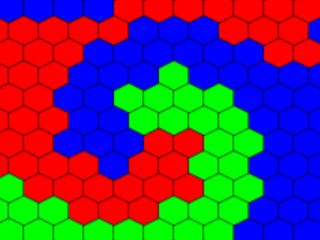
 As the GameDev.tv Game Jam gives participants a free course, I figured I had to do something with this Jam. The theme of the jam was “Life in 2 Dimensions” so my immediate thought came to Conway’s game of Life. Life is a cellular automata simulator with a set of very simple rules for running that results in surprising results. My first change was to place the automata on a hex grid. I then added three types of life and set the rules so Red cells eat Green cells which eat Blue cells which eat Red cells. My idea was that I would have levels where you would place cells in such a way that your color would dominate the board.  I also made the decision to write the game entirely from scratch. 

What Went Right

The actual simulation aspect game together quickly and my preliminary test showed that it worked producing a rather interesting swirling effect. While the simulation is fun to play with for short bursts, and random mode makes rather interesting displays, by itself it is not really a game. My idea for a game was to have the player control one of the colors and attempt to turn the board entirely that color.  This, will be discussed in the what went wrong section.

Mixed Blessings

The decision to do the game from scratch was a good one considering I am planning to build a game engine from scratch so this would be good practice. I had not anticipated as much interruption from the real world as there was but it was good practice getting back to building everything. Had I gone with my own libraries, I would have been able to do a bit more polish on the game but as things stand it doesn’t look too bad the way that it is. While eating up a bit more time than I would have liked, creating the UI from scratch let me play around with different, and better, techniques than I have in my rather dated and overly simple SLL libraries. This will be helpful as I get further along in the book series I am working on.

What Went Wrong

While the sim as it stands has nice flashy displays, it is not quite enough to allow for good strategic design. I am sure that there are additional features and rules that could be added to allow for more strategy allowing for a challenging game, but that is not here. Unfortunately, the way the rules work make for a fairly easy way for finding solutions to win the game. I am undecided if I will revisit this game but with more rules and other features to increase the challenge of the game but that is certainly a possibility.

Final thoughts

I have been reneging on this blog, so I am thinking about taking my code for the game and cleaning it up going over the code and what I am doing to improve it. This would also result in some soapbox posts about a variety of topics. I'm not sure how often I am going to update this but may go to a fortnight format where I update  my book on Spelchan.com in one week and then post about my refactoring on this blog. I may also consider entering more game jams, depending on what my schedule is going to be like.


Saturday, May 27, 2023

HexLife Beta

This is it for today and I am not sure how much time I will have Sunday and Monday, probably just Monday morning. The beta is on Spelchan.com, but there is a lot of work that needs to be done. What I want to get done before Monday’s deadline:

  • More levels, as a single simple test level is not much of a campaign.
  • Better title screen
  • Instruction screen

What I hope to get done by Monday:

  • Transition animation between generations.
  • Ability to save and load levels.

What I will do after Monday’s deadline:

  • Write a postmortem.
  • Clean up the code. Right now, pretty smelly as I fell into the time pressure trap.

Possibly spend a few weeks going over my code (not sure if this would be here or on Spelchan.com). 

Thursday, May 25, 2023

Hex Life Editor update

 I forgot how much work creating a GUI from scratch was. This is why libraries are nice but I am doing this from scratch. I now have an editor but still need to add a way of taking the edited levels and playing them as well as set goals for a level and a partial editor that lets the player place their color of cells on the board. 

Early build of editor mode for my HexLife game

My thoughts are that the goal will be to give the player an existing layout sans their color, and they need to strategically place their color in such a way that their color will end up taking over the entire board. I am not sure I will have much time at all tomorrow to work on this, but should be able to release a version of the editor and player Saturday. This would leave Sunday and Monday to create a set of levels and fine tune things.

Tuesday, May 23, 2023

Let there be Life

 When I said I was going to program the game from scratch, I wasn’t kidding. As I am trying to move back to test driven development, as I believe the AI world of programming will become more natural language programming with the responsibility of the programmers to make sure that what the natural language produces actually works properly so creating and testing programs will become a vital skill for the future of programming. I don’t think programmers will be going away, but their roles will be more focused on design, testing, security, and optimization. Still, using a testing framework would be third party, so I wrote my own simple testing framework (when I post the final version the tests will be included).

Writing automated tests seems to be slow, but I notice that I find bugs much quicker and am a bit more confident that my code does what it is supposed to. My tests are not as thorough as they should be but good enough for the scope of the project I am working on.

When creating the game, I realized my idea of moving cells was very problematic, so opted for a growing effect with the eating of cells being a predominant feature. Text versions seemed to work so I bit the bullet and created a graphical version (manually tested as graphics/GUIs are way too painful to automate, and if the underlying code it calls is tested there shouldn’t be a problem).

The simulation was automated and just generating random grids results in really cool results. The first phase has been posted so Thursday I will be focusing on creating an editor and the weekend on putting together a short campaign where you will be given a map and need to place your cells in such a way that they will take over the map. Something has come up for Wednesday, so while I might get an hour or two in, it is likely not going to be very much. Hopefully I will have something Thursday night to show, as Friday is busy. Why everything comes up when I want to do a Game Jam is annoying, but it is what it is.

The first build is available at https://spelchan.com/games/y2023/HexLife/index.php

See you Thursday???

Friday, May 19, 2023

GameDevTV Jam 2023 Planning

 It has been a while since I have posted something here, but now that I have a tiny bit of time, I can finally work on my own things, so am entering the GameDevTV jam for this year. Why? Everyone who enters gets a free course so why not? I am going to be focusing my free time on writing some books on creating a game engine from scratch, so in preparation for the game jam I will spend the days I am able to work on it creating a game from scratch. Unfortunately, I still do have other obligations so will only be able to get in 30-50 hours during the 10 days so will have to take that into account. I am losing this first weekend and next Friday for sure and suspect there will be interruptions on other days so we will see how much I am able to do.

What do I mean by from scratch? There will be no libraries or frameworks other than the standard libraries and what DOM provides. I will write all the code. Ideally,I will extend this restriction to artwork and sound effects but that will depend on how much time I have at the end for polishing the game.

The theme of the game is Life in 2 Dimensions. The thoughtI immediately came up with is some variation on Conway’s Game of Life (CGL). Doing a straight CGL would not be much of a challenge, but if I did this more like a strategy game then there could be something interesting.

My idea is to use a hex grid where there would be 3 distinct types of cells which are either food or enemies. Red Cells eat Green cells which eat Blue cells which eat Red cells. Each round is broken into phases. Phase 1 would be the absorption phase where the cells around each cell is counted. If there are more enemy cells touching a cell then allies, the cell will be absorbed becoming an enemy cell otherwise it stays the same. The next phase is the movement phase.  

The rules for movement are easy. Head towards the nearest food cell (or, fake food cell when I add that later) though only using empty cells, so will stay still if cells closer to food are currently blocked.  Not sure what order the cells will move in, will be playing around with that aspect. 

The game will be an attempt to convert the entire board to your color. With the ability to place fake food on the board to guide the activity. I am hoping to have a crude version of the game by Tuesday or Wednesday as due to other obligations I am not going to be able to start until Monday. 

Tuesday, June 14, 2022

Death of the Phoenix Postmortem

 On itch.io, I noticed that gamedev.tv was having a game jam where all entrants got a free course. I decided to enter but have noticed a very unfriendly opening advertisement when I go to the gamedev site so am a bit leery.  The game I quickly wrote is on Spelchan.com and is called Death of the Phoenix as the theme of the jam was “Death is only the beginning” so this matched the theme. Here is my postmortem of that effort.


What went wrong

One of the most important aspects of a game jam is that due to the limited amount of time you need to have a realistic plan. The best approach is to start off with a basic game then, once it is working, add features until the time runs out. With a theoretical 10 days, it was easy to have a more ambitious plan. Unfortunately, I am taking care of my father who recently had a stroke and ended up partially paralyzed. With my caregiving responsibilities, the amount of time available to me is limited so a day is only a few hours and ended up being even less. 

My original plan was to have a map that the player would need to explore to find the material for building the nest and the location of the nest. The story would be told as brief cut frames that would happen when certain tiles were traversed, and there would be areas where the player would be able to restore their health that would act as save points if the player died.

When it became clear that the amount of working time was less than anticipated, my plans needed to be changed. I had implemented the combat system so decided to drop the map and simply have a visual novel instead. 


What went right

My original story system would have a class that would use a JSON object to provide the layout information for the scene. I had hopes that there was spare time left I could add animation parameters to the JSON data and have animated cut scenes. The JSON data format is a simplified version of class definitions in JavaScript making it extremely easy to use as objects. Because it is a human editable format, it is easy to create by hand. This makes putting together a script very quick and does not require code be written. I was even able to use the room scripts for the title screen and losing screen making a very quick visual novel language.

I want to expand this into a proper adventure game engine so will be experimenting with using JSON as a script (or collection of scripts) for some of my adventure game ports that I am planning to do. The data-driven approach makes some sense, and when combined with a command pattern may make for a straightforward way of quickly building episodes for a multiple episode adventure game but don’t want to go into details until I have something concrete. 


Mixed blessings

 My original intention was to do all the artwork myself but for prototyping I made the fortuitous decision to use creative common and public domain artwork as my placeholder art. This had the advantage that if I did run out of time, the art already is there, and I simply need to add attribution text to the game page. The downside is that mixing assorted styles of art makes the scenes less seamless. This can be fine in different regions of the game but can still be jarring. This is a worthwhile tradeoff as having a releasable build, even if not as polished as desired, is a good safety net.

Temporary artwork does need to be from a source that you can use, which reduces the source material, but does not need to be public domain or creative commons. Having royalty free assets would also work for temporary artwork. I have bought several bundles of royalty free music and art so simply need to go through the libraries I have and start using them.


Future plans

While I don’t expect to do anything with this game, I will be experimenting with building an adventure game engine using some of the approaches used in this game. I'm not sure how quickly this will be done as my time for work is limited, but an adventure game engine which is general enough for other games would allow for several of my larger projects to be completed quicker, so is a good direction to go.


Sunday, November 15, 2020

Porting a Game in Zero Hours


Way back in 2014, I participated in a game jam called the Zero Hour Game Jam, with the idea being that you had to write the game between 2AM and 2AM when the times switched for daylight savings time. This “missing” hour would we the time you wrote your game in. The rules were “there are no rules.” Wanting to keep the spirit of the Jam, I decided to do my coding during the jam, but allow myself to prepare artwork beforehand. While I did not have to do the same thing with the port, as the time switch was happening on November 1st and because there is talk of getting rid of daylight savings time (had something called Covid-19 happened, it is possible that there wouldn’t be daylight savings time in BC as voters overwhelmingly want to get rid of it as it serves no practical purpose but does pose medical problems to some people) so this may be the last chance I have to do a game in 0 hours. While there are Zero Hour jams running this year, I opted to do my own Zero Hour Port where I take my original Zero Hour game and re-write it in JavaScript so it will be playable since Flash is no more.

My rules for this port were simple. Pre-Jam preparations were allowed which simply consisted of using my old copy of Flash to create a sprite sheet of the assets in the original game and to convert the resulting JSON file from this sprite sheet that was generated into my own condensed format. A sample of my JSON format is shown below. I am also allowing myself to use my Vampire Attack game from last month as skeleton code to quickly hack out a working game.

ZHAtlas = {

    //"ContinueBtn": {"x":0,"y":0,"w":350,"h":82, "over_x":358,"over_y":0,"down_x":0,"down_y":90},
    "KeyABtn" : {"x":0,"y":0,"w":94,"h":84, "over_x":102,"over_y":0,"down_x":102,"down_y":0},
    "KeyDBtn" : {"x":204,"y":0,"w":94,"h":84, "over_x":306,"over_y":0,"down_x":306,"down_y":0},
    "KeyQBtn": {"x":510,"y":0,"w":94,"h":84, "over_x":612,"over_y":0,"down_x":612,"down_y":0},
    "KeySBtn": {"x":714,"y":0,"w":94,"h":84,"over_x":816,"over_y":0,"down_x":0,"down_y":0},
    "KeyWBtn": {"x":918,"y":0,"w":99,"h":84,"over_x":0,"over_y":92,"down_x":0,"down_y":92},
    "KeyEBtn": {"x":214,"y":92,"w":94,"h":84,"over_x":316,"over_y":92,"down_x":316,"down_y":92},
    "continueBtn": {"x":418,"y":92,"w":216,"h":50,"over_x":642,"over_y":92,"down_x":0,"down_y":184},
    "Zombie": {"x":448,"y":184,"w":546,"h":656},
    "backdrop": {"x":0,"y":848,"w":512,"h":256}
}

As you can see by looking at the above JSON code, objects in the games are named and given information about coordinates and size. Buttons also have additional coordinate information for their over and up states. The sprite sheet is too big to put here but is available in the git repository for those of you who wish to view it.

Once the missing hour started, I copy and paste code into a new project. The HTML boilerplate is pretty much unchanged just with some redundant code removed and the name of the game and script changed. The js file linked to from the html file really doesn’t need too much to be copied from Vampire Attack. First I paste in my JSON file and turn it into an object, that is the one thing I do love about JSON. Then I copy the button class and turn my ScreenHandler class into the game class. I am figuring that I can simply have the title screen and win/lose screens built into this one screen, which in hindsight was a bit more work than I expected.

Drawing the backdrop is trivial so for my rendering routine I simply draw the backdrop image. Then, which is not shown in my final code, I want to make sure the buttons are rendering properly so I render all of them using a for loop. The button class uses a callback mechanism so implementing the handler is trivial. For quick testing the handler just displays a console message but game logic will be going here shortly.

With the user interface implemented, it is time for the gameplay. This involves the zombie moving toward the player. Here is where I wish that more time was spent examining the original code for doing this. While writing scaling code is trivial, having the zombie at the center of the screen didn’t look very good as the zombie was floating in the air. The obvious quick fix for this problem is to shift down the y coordinate. This solves the footing problem, but as we are scaling at a constant rate the zombie appears to slow down as it starts reaching the player. Playing a few times it is a bit surreal but sort of like what you would experience as your adrenaline started kicking into overdrive so figured I would leave this alone unless there was time at the end to fix it.

Now clicking on a button adjusts the zombie distance, and when the zombie is far enough away we log a win. If the zombie gets too close we log a loss. The problem is that all the keys will let the player run, making the game too easy. This is easily fixed by picking one of the keys at random and only rendering/accepting that key. This meant that keyboard support had to be added which isn’t hard. The keyboard handler for key down looks at the key being pressed and checks to see the character is the same as the expected character and if so calls the player step method for moving the player. The button handler does likewise so we have both keyboard and mouse/touch suppprt.

    playerStep() {
        this.zscale -= .06;
        this.cur_key = Math.floor(Math.random()* 6);
        if (this.zscale < .1)
            this.nextScreen(); // note this was a console log earlier
    }

At this point I am thinking that I am almost done and will be able to add sound, music, and maybe even fix the zombie motion. First, however, we need title, win, and lose screens. Choices here are to cut an paste the screen handling code from Vampire Attack and have different screens. Or as there are just messages to display I could just do everything within the existing screen. Feeling the later would be faster, I opted to go for that approach. I don’t think it ended up being faster and added some ugly code to my project so was ultimately a poor decision.

To add a title screen, a showTitle flag was added. When set the title text gets shown. A playing flag determines if the game is in progress. If the game is not being played, a separate message (for winning, losing, and extra title text) will be shown. To handle the transition between the different states, a next screen method was written as shown below. This code gets called whenever a screen transition should occur which includes winning, losing, clicking to return to title, and starting the game from the title.

    nextScreen() {
        if (this.playing === true) { // game ended
            this.cur_key = 6;
            this.playing = false;
            if (this.zscale >= 1) {
                this.message = "You have died!";
            } else
                this.message = "You Escaped!!!";
        } else if (this.showTitle === true) {// game starting
            this.cur_key = Math.floor(Math.random()* 6);
            this.zscale = .5;
            this.showTitle = false;
            this.playing = true;
        } else { // return to title
            this.cur_key = 6;
            this.message = "Billy Spelchan's Zero Hour Game port";
            this.showTitle = true;
        }
    }

Once I finally finished the screen transition logic there was few minutes left but I was too tired to continue so the sound effects, which probably could have been added in only a couple of minutes, was dropped and I figured I would go to bed and put up the game when I woke up.  The code for this game is available in the git repository for those who are interested. Not sure what will be next month, but I do have an interesting multi-part series where I create a game then demonstrate different approaches to solving that game. If I have time to do a Christmas game (slim but non-zero) then I will do a postmortem on that game otherwise I will start the new series.

Wednesday, September 16, 2020

JS13K Postmortem

 Due to family matters, I simply did not have time to finish my entry for the JS13K competition. I am still, however, going to do a postmortem. 

What Went Right – Good Idea

The theme for the competition was 404. This is the Page Not Found error code for HTML pages. The idea I had was a stealth game where you need to find your way out of a procedurally generated multi-level dungeon while avoiding being detected by the 404 inhabitants. Ideally, assuming I could squeeze it into 13k, I would have used my ray caster to  have the game in 3D using a procedurally generated rock texture. The sprite for the enemy would be generated using simple drawing commands then made into a sprite sheet.

To make sure the game was completable I was going to write a utility to play through randomly generated levels keeping the seed to the levels that could be completed then use the seeds for level data. This is related to my thesis work as part of my work involves creating solvers for playing through procedurally generated platformer levels.

Mixed Blessing – Components Completed

Parts of the game had been completed before hearing the bad news about my father but because I never actually got to finish the game, I consider this to be mixed. Perhaps I will be able to use the code in a future project. Three things were completed before hearing the bad news. I had a random number generator (based off of PCG) so reseeding would be possible. This is necessary for JavaScript as there is no was of seeding the build-in random method. I had my map generator for generating the levels. And I had the texture generator for generating the rock texture and with parameters and color changes this would have even allowed for variety between the map levels.

What Went Wrong – Family Matters

Things have been totally nuts over the last few weeks. With bad news regarding my father, relatives have been visiting in case they don’t have another chance (a real possibility but as this is a private matter I will not go into details). Combined with having to drive to different cities to take my father to appointments and dealing with lawyers and accountants my spare time was next to none. Then the fridge died and needed replacing. So needless to say, the real world was not kind to me so the only choice I had was to cancel the game development which is sad as I think if I could have pulled off what I wanted to accomplish it would have been a great entry.

Not sure what I am going to do next month. Probably a post-mortem on porting my Vampire Attack game from Flash to JavaScript, but going over my texture generator is also a possibility.


Wednesday, December 6, 2017

Making Santa’s Snowball part 2 - Multiple Scenes

Not much progress was made as I am upgrading my PVR so the weekend and last few evenings were spent getting caught up with my tv shows as I will lose everything on the PVR when the swap is done. I suppose this is a mixed blessing as I have been overdoing things lately so having a forced break was probably good but that means that the port of Evil Gnome’s Revenge may be delayed. I was hoping to post the game this weekend, and still may be able to, but working while watching TV is not very productive.  Still, either this weekend or next weekend will be the second game in my Santa trilogy where you play the bad guy and need to chase Santa’s reindeer out of their corral.

Last week we looked at the preloading of the assets. With all the assets ready to be used, we still have the problem of dealing with multiple scenes. Animate CC 2017 does not handle multiple scenes at all so my solution when creating multi-scene projects in Animate was to simply put each scene in its own MovieClip and then have the main timeline have keyframes with each of the difference scene movies in it. When you think about it, if you have total control over the stage then having a MovieClip that contains all the scenes is not necessary as you can simply have a single scene MovieClip on the stage at a time. This has the additional benefit that you don’t have to worry about removing event listeners as when a MovieClip is not on the stage it will not be getting the events. The following is my switching code:

spelchan.SantaSnowball.switchScene = function(newScene, e) {
var stage = spelchan.SantaSnowball.stage;
stage.removeChildAt(0);
switch(newScene) {
case spelchan.SantaSnowball.TITLE_SCENE:
stage.addChild(spelchan.SantaSnowball.titleScene);
break;

case spelchan.SantaSnowball.PLAY_GAME_SCENE:
stage.addChild(spelchan.SantaSnowball.playScene);
break;

case spelchan.SantaSnowball.ABOUT_SCENE:
stage.addChild(spelchan.SantaSnowball.aboutScene);
break;

case spelchan.SantaSnowball.INSTRUCTIONS_SCENE:
stage.addChild(spelchan.SantaSnowball.instructionsScene);
break;
case spelchan.SantaSnowball.WIN_SCENE:
stage.addChild(spelchan.SantaSnowball.winScene);
break;

case spelchan.SantaSnowball.LOSE_SCENE:
stage.addChild(spelchan.SantaSnowball.loseScene);
break;

case spelchan.SantaSnowball.BIG_LOSE_SCENE:
stage.addChild(spelchan.SantaSnowball.bigLoseScene);
break;

}
}

In hindsight, this is not the best way of doing this. I have come up with two better ways of doing this. The first way is to have an array of scenes and create each scene using the numerical constant as an index into this array. A simple verification that the index is valid then remove the old scene and add the new scene to the stage. Much easier code. I use numerical constants for efficiency but when you consider that this function is not being called that often and the constants are fairly large chunks of text that are transmitted it may be more practical just to use string names for the various scenes. As JavaScript uses associative arrays for variables, you could simply tie the scenes to actual variables within the class for your game. This is the approach I will be taking for the second game in this trilogy.

As can be discerned from the code, there are seven scenes that make up this game. Five of these scenes just consist of images and text with a button leading back to the title screen. The title screen has a slight bit of animation, plays a musical clip, then has three buttons for navigating to other scenes. The title screen actually is a good demonstration of one of the problems with my scene switching system. The movie clips do not restart when they are switched to. This could be forced by the switcher by simply calling a gotoAndPlay method but this would require that all the scenes have a gotoAndPlay method, which is not that big of an issue but something that needs to be considered.


An example of when you may have a scene that is not a movie clip is my Billboard class. This is created as a container that holds three objects. The class does do some animation but instead of making this animation frame based, it is controlled by separate function calls which take advantage of tweens to perform the animation. This allows for the billboards to remain open for a different amount of time based on the level of the game. I even take advantage of their flexibility by having the act of throwing a snowball adjust the closing timing of the billboard.

More on that next week where we finish off the game and take a look at the tween.js class in more detail.

Wednesday, December 31, 2014

2015 Plans

I suppose I should be doing a postmortem of Snowman's Fez, here but since I never finished the game the way I wanted (yes, it's playable, is a game, and has a beginning and an end but it is not the game I wanted to create) I am going to instead take this time to write about my 2015 plans.

I am in the process of upgrading my degree to a bachelor degree through online/correspondence courses offered by a B.C. University. I am not entirely sure this is the best way of learning, but it is the way that most companies who are likely to hire me look for. While I would like the cheaper online alternatives to be viable, they are simply not there yet. This is unfortunate, but unlike the tech industry, change is really slow in the real world. The big disadvantage of going with University online/correspondence type courses is that you don't have the feel for what exactly the teacher is looking for so as a result you must learn much more of the material than would be necessary in the classroom. The ability to work at your own pace (within the time-limits the University puts on the courses) to me is worth the extra work learning.

There are probably many people who think that the extra flexibility means that there should be ample time to finish a game a month. To some extent this is true but knowing how easy it is to procrastinate, one has to take care not to get side-tracked on personal projects. That said, many of the courses I am taking do have some flexibility with the projects that are created. When possible I plan on doing game-related projects. This way I will get to combine my University hours with my One Game A Month hobby. This assumes, of course, that there are no issues with me doing this which I simply don't know yet.

When there are no course projects to use for 1GAM then picking an interesting game jam will be an option. Perhaps a better option would be to take one of the numerous games I want to do more with and do another pass on that game. Implementing the rather neat combat system I came up with for Snowman's Fez, for instance. If anyone reading this has a preference between those two options (original Jam stuff or enhanced existing stuff) feel free to email me with your opinions.

One project I am thinking of doing again is my NES RPG project. I would do a post in the middle of each month focusing on that project, and at the end of each month I would do a rant or a postmortem of whatever game I released for 1GAM. Email me if you are interested in this but I probably won't start doing this until March or April.

So in summary, I am going to be focused on my University work, but do plan on continuing with 1GAM. When/if possible both will be done together.

Friday, August 29, 2014

Hello Again World.

Welcome to my new blog. This is a replacement for my Blazing Games Development blog which due to the fact that Blazing Games Inc. is closing down is no longer appropriate. This will be fairly similar to the Blazing Games blog in that the focus will be on game development and programming. Unlike the old blog, I will not even pretend to keep to a regular schedule for updating this one. As I do plan on continuing my 1GAM (One Game A Month) challenge, I will be posting here at least once a month.

So, at least once a month I will have a postmortem of whatever game I released for that month. Some of those games will be part of my NES RPG project. For those who haven't followed my development blog, this is a project where I am slowly creating a quality role-playing game for the Nintendo Entertainment System (or at least emulators as most people don't have flash cartridges for their NES). This is being done by creating a number of mini-games that explore different facets of the NES and slowly lead to the parts necessary for a full RPG. This is combined with articles explaining the learning and though-process behind the code.

The progress of the NES RPG project will be slow as I am heading back to University to upgrade my credentials to a Bachelor degree. This is also the reason why I am not going with a weekly format. More to the point I am hoping to get part-time work while going to school so my bank account isn't drained too much. So, if you know a Canadian company looking for some programming work (not necessarily Game development, though obviously that would be great as well) let them know about me or me about them. Thanks and I hope people actually read this blog in the future!